

Acebuilder vs Framer: Code Ownership vs Design Canvas
Framer wins on visual design and its all-in-one website stack. Acebuilder is for teams that want an AI-built landing page as editable React and Tailwind source.

Manu Arora
Founder, Aceternity
On this page▾
- The short version
- Acebuilder vs Framer at a glance
- Framer wins on design, and it is not close
- Acebuilder wins when the page needs to become part of your product
- Code ownership is more complicated than one export button
- Framer is much better at running a marketing site
- The editing experience is canvas vs conversation
- Which one is faster?
- Pricing: Framer starts cheaper
- The honest verdict
- Frequently asked questions
- Pick the place where you want to keep working
Quick answer: Pick Framer if you want the best visual canvas, built-in hosting, CMS, analytics, and a polished workflow for marketing teams. Pick Acebuilder if you want AI to build the landing page as React + Tailwind source code that you can download, change in your own repository, and host anywhere. Framer is a website platform. Acebuilder is a code ownership play.
Updated August 2026.
The short version
I run Acebuilder, so let me get the bias out of the way early. I still think Framer is the better product for a lot of people.
If you are a designer, marketer, or founder who wants to make a polished website and never think about a repository, Framer is hard to beat. The canvas is excellent. Publishing takes a click. Hosting, CMS, analytics, SEO controls, localization, and staging can all live in the same product.
Acebuilder makes a different trade. You describe the landing page, work with the AI in chat, edit against a live preview, and download the full React + Tailwind project when you are done. You give up Framer's mature visual canvas and built-in website stack. In return, the page is yours to keep building in Next.js, Vite, Cursor, Claude Code, or whatever comes next.
That is the real comparison. Both can make a good landing page. The decision is whether you want a managed website or a codebase.
Acebuilder vs Framer at a glance
| Category | Acebuilder | Framer |
|---|---|---|
| Best for | Founders and developers who want source code | Designers and marketing teams who want an all-in-one website platform |
| Primary workflow | AI chat, live preview, targeted edits | AI agent plus visual canvas |
| First-draft design | Strong, built from Aceternity UI | Better overall polish in my test |
| Output | Editable React + Tailwind project | Framer project and hosted site |
| React source export | Yes | No editable React + Tailwind project export |
| Hosting | Bring your own host | Built in |
| CMS | Add your own | Built in |
| Analytics | Add your own | Built in |
| Free plan | No | Yes, with a Framer domain |
| Entry paid plan | $25/month | $10/month with yearly billing |
| Best reason to choose it | You own the working codebase | You can run the whole marketing site in one place |
Prices and features were checked on August 17, 2026. Framer changes plans often enough that I would still check its current pricing page before paying. The same goes for Acebuilder pricing.
Framer wins on design, and it is not close
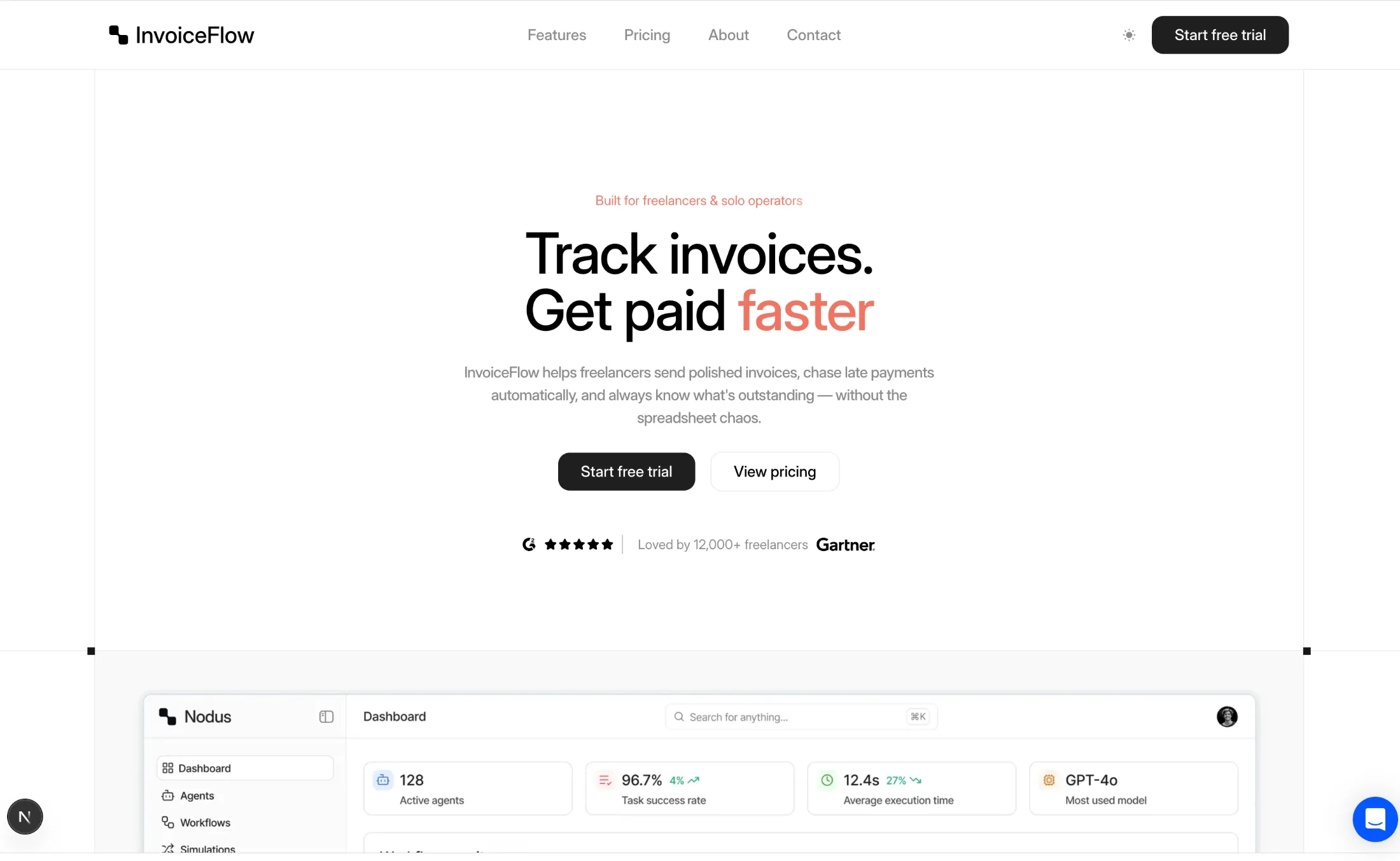
I tested seven AI landing page builders with the same InvoiceFlow prompt for my best AI landing page builders comparison. Framer produced the best-looking first draft.
The spacing was better. The type scale felt considered. Sections flowed into each other instead of looking like blocks that happened to share a background color. AI builders are getting fast, but most of them still struggle with that last 15 percent of visual judgment. Framer has it.
The canvas is the bigger advantage after generation. You can take over and adjust layout, breakpoints, type, effects, and components directly. You are not asking an agent to move a heading six pixels and waiting to see what else it touched. You just move it.
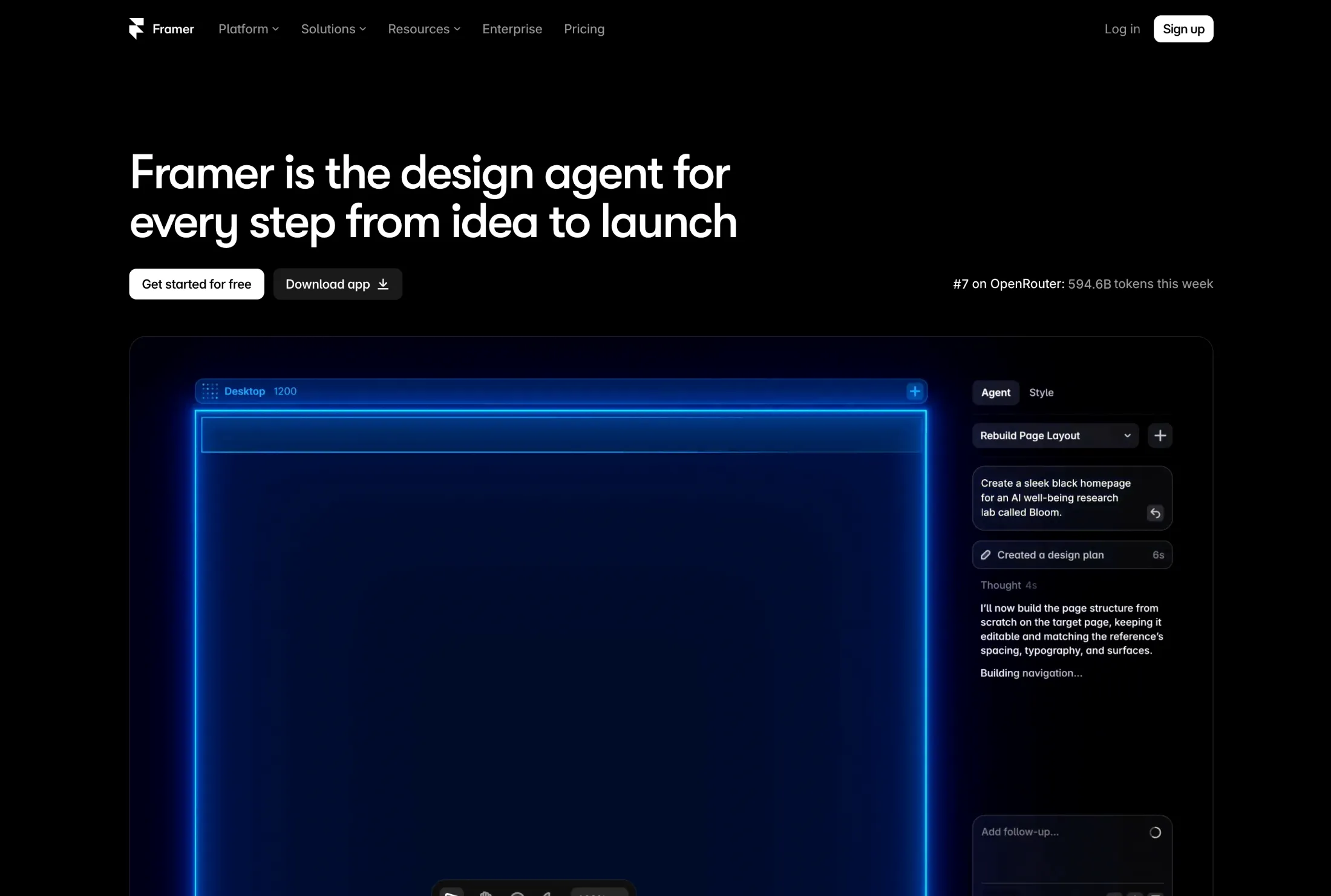
Framer's AI has also grown past the old Wireframer. Its current agent can create editable pages, sections, copy, and visuals inside the project. It can work with the CMS, make code components, and review issues such as missing alt text or inconsistent styles. This is a much more complete product than "type a prompt and get a wireframe."
If your team thinks visually, this matters every day.
Acebuilder wins when the page needs to become part of your product
Acebuilder starts from the other end. The output is a real React project styled with Tailwind, not a design project that you keep operating inside Acebuilder.
Acebuilder is an AI landing page builder powered by Aceternity UI that generates production-grade React + Tailwind code you fully own.
That sentence can sound like normal SaaS marketing until you need to do something annoying and specific. Add the page to an existing Next.js app. Use your authentication state in the navbar. Pull pricing from your own API. Move the site to another host. Ask Claude Code to refactor the hero six months later. Put everything in the same repository as the product.
Those jobs are straightforward when the landing page is already code you control.
Acebuilder can start from a blank Next.js, Vite, or TanStack project, or from an Aceternity UI template. You can drop in individual blocks, attach visual references, select an element in the preview, and ask the agent to change only that part. When the page is ready, download the project as a zip and keep working outside Acebuilder.
The downside is just as concrete. There is no Framer-style design canvas. You need to arrange your own hosting, CMS, analytics, forms, and deployment workflow. Developers often read that list and think, "Great, I wanted to choose those anyway." A solo founder who only wants a site online may read the same list and close the tab.
Both reactions are reasonable.
Code ownership is more complicated than one export button
This section needs some care because "you own your site" can mean four different things:
- You own the text, images, and other content.
- You can export CMS data.
- You can download the published HTML, CSS, and JavaScript.
- You have the editable source project in the framework your team uses.
Acebuilder is built around number four. You get the React + Tailwind project that the agent worked on.
Framer clearly lets you own and move your content. The source-code question is oddly messy right now. As of August 17, 2026, two official Framer Help pages, both marked as updated on August 7, contradict each other:
- Porting your data from Framer says you can download the full published site as HTML, CSS, JavaScript, and assets, then host it elsewhere.
- Can I export my website to HTML and self-host it? says Framer does not provide HTML export or static bundles for self-hosting.
I cannot make those two statements agree. If self-hosting matters to you, check what export options exist inside your account and ask Framer support before you commit. Do not base a migration plan on a comparison article, including this one.
Even if the published output download is available, it is not the same as receiving an editable React + Tailwind repository. A production bundle is useful for moving a site. Source code is useful for continuing to build it.
That distinction is the whole Acebuilder argument.
Framer is much better at running a marketing site
Framer does not stop when the page looks done. That is probably its strongest product decision.
On a paid plan, you get managed hosting and a custom domain. The Basic plan includes two CMS collections and 30 days of analytics history. Pro adds ten CMS collections, redirects, staging, branching with previews, and 90 days of analytics history. Localization, A/B testing, larger CMS limits, and advanced hosting are available through higher plans or add-ons.
This makes Framer a good home for a real marketing team. A designer can change a section. A content editor can update the CMS. The growth person can read analytics. Nobody has to open a pull request to fix a typo.
Acebuilder does not try to replace that stack. It gives you the site project. What happens next is your choice, which also means it is your work.
You can deploy to Vercel, Cloudflare, Netlify, or your own server. You can use Sanity, Contentful, MDX, or no CMS. You can add PostHog, Plausible, Google Analytics, or nothing. That flexibility is useful when you already have opinions and infrastructure. It is overhead when you do not.
Pick Framer if the website is a product your marketing team operates every week.
Pick Acebuilder if the website needs to live beside the software your engineering team already operates.
The editing experience is canvas vs conversation
Framer gives you direct manipulation. Click the layer. Drag it. Change the font. Adjust the breakpoint. Preview it. Ship it.
Acebuilder gives you an agent working on a codebase. Ask for a section, attach a reference, select an element in the preview, or open the generated files. The agent can make broader changes than a visual property panel because it can edit application logic and project structure. It can also misunderstand you and touch too much. That is the trade.
For small visual adjustments, the canvas is faster. For changes that cross design and code, the agent can be faster.
Here is a practical example. Say you want the pricing cards to show the user's current plan after login.
In Framer, you can write a code component or connect custom logic, but now you are mixing a hosted visual project with custom React behavior. Framer supports that, and skilled Framer developers do impressive work with it. It is still Framer's environment.
In Acebuilder, the pricing section is already in your project. Read the session, pass the plan into the component, and render the state. Less magical. Easier to reason about if you are used to application code.
The reverse is also true. If you want to nudge every breakpoint until a campaign page looks perfect, Framer's canvas is a nicer place to spend the afternoon.
Which one is faster?
For prompt to beautiful first draft, Framer won my test.
For prompt to codebase I can merge into a product, Acebuilder wins because that is the output it was built to produce. There is no recreation step after approval.
For prompt to live hosted marketing site with a custom domain, Framer has the cleaner path. Hosting is part of the product, and publishing is a button.
So "faster" depends on where you stop the clock.
| Finish line | Faster choice |
|---|---|
| Best-looking AI draft | Framer |
| Precise visual editing | Framer |
| Published site on managed hosting | Framer |
| Editable React + Tailwind project | Acebuilder |
| Landing page inside an existing app | Acebuilder |
| Custom application behavior | Usually Acebuilder |
Pricing: Framer starts cheaper
Framer has a free plan with a Framer domain and 500 trial AI credits. Its Basic site plan is listed at $10 per month with yearly billing. Pro is $30 per month. Extra full editors are $20 per month, and some features such as extra locales, A/B testing, and advanced hosting cost more.
Acebuilder has no free plan. Pro is $25 per month, Business is $50, and Studio is $129 at the time of writing. All paid plans include access to Aceternity UI components and Pro templates, and you can buy more AI credits separately.
If you need one simple portfolio or brochure site, Framer Basic is cheaper and includes hosting. Easy win.
If you are comparing the products for source code, the monthly price is not the whole calculation. With Acebuilder, you can download the project and cancel without losing the exported files. With Framer, you are paying for the editor, hosting, CMS, analytics, and publishing system as an ongoing service. That recurring cost is fair if you use the system. It is harder to justify if your engineering team ends up rebuilding the page in React anyway.
The honest verdict
I would choose Framer for:
- A portfolio
- An agency site
- A content-heavy marketing site
- A campaign page that marketers need to change themselves
- A team that wants design, CMS, hosting, and analytics together
I would choose Acebuilder for:
- A SaaS landing page that will join an existing app
- A developer-owned marketing site
- A team that wants React and Tailwind from the start
- A page with custom product behavior
- Anyone who wants to keep building with coding agents after export
If you are not sure, ask one question:
Six months from now, who will make the weird custom change?
If the answer is a designer or marketer in a visual editor, pick Framer.
If the answer is a developer or coding agent in a repository, pick Acebuilder.
That will tell you more than any feature checklist.
Frequently asked questions
Is Acebuilder better than Framer?
Acebuilder is better when you want an AI-generated landing page as editable React + Tailwind source code. Framer is better when you want a mature visual canvas with hosting, CMS, analytics, SEO tools, and publishing in one platform. Neither is better for every team.
Is Framer better than Acebuilder for designers?
Yes, in most cases. Framer has a mature visual canvas, direct layout controls, breakpoints, effects, and a large template ecosystem. Acebuilder is easier for people who prefer describing changes to an agent and working with the resulting code.
Can I export a Framer website?
Framer's official documentation currently gives conflicting answers. One Help page says full published HTML, CSS, JavaScript, and assets can be downloaded. Another says HTML export and self-hosting are not available. Check the export options in your Framer account and confirm with support before you plan a migration.
Does Framer export React source code?
Framer does not provide the same kind of editable React + Tailwind project that Acebuilder exports. Framer supports React code components and can share components for use in React environments, but that is different from downloading the full website as a normal application repository.
Do I own the code generated by Acebuilder?
Yes. You can download the project as a zip, keep the generated React and Tailwind source, modify it outside Acebuilder, and host it elsewhere. Your use remains subject to the Acebuilder terms and the licenses of any included libraries or assets.
Does Acebuilder have a visual canvas like Framer?
No. Acebuilder has a live preview, targeted element selection, chat-based editing, and access to the generated files. It does not provide the same direct visual design canvas that Framer does.
Does Acebuilder include hosting?
Acebuilder is focused on generating the project and giving you the source code. You should expect to use your own hosting and deployment workflow. Framer includes managed hosting as part of its paid site plans.
Which one is better for a SaaS landing page?
Acebuilder is a better fit when the landing page needs to share code, authentication, data, or components with the SaaS product. Framer is a better fit when the marketing team wants to own the site without depending on developers.
Which one has better AI-generated design?
Framer generated the most polished first draft in my seven-tool landing page test. Acebuilder produced a strong page using Aceternity UI components, but Framer was better at spacing, typography, and overall visual flow.
Which one is cheaper?
Framer starts cheaper. It has a free plan, and Basic is listed at $10 per month with yearly billing. Acebuilder starts at $25 per month. Framer add-ons and extra editor seats can increase the total, while Acebuilder usage can require additional AI credits.
Can Framer build custom React components?
Yes. Framer supports React code components and its AI agent can help build them. Those components run inside the Framer project. This is useful for custom interactions, but it is not the same workflow as owning the whole website as a standard React repository.
Can I use Acebuilder code in Next.js?
Yes. Acebuilder can start from a Next.js project, and the exported React + Tailwind files can continue in your own Next.js repository. You still need to review dependencies, environment variables, and any application-specific integration before shipping.
Which tool is better for CMS and blogs?
Framer is better if you want a CMS included and editable by non-developers. Acebuilder gives you the code, so you can add MDX or connect a CMS of your choice, but you must set it up and maintain it.
Which tool is better for SEO?
Framer includes built-in SEO controls, hosting, metadata, redirects on Pro, and automatic site infrastructure. Acebuilder lets you implement SEO directly in your React application, which gives you more control but also more responsibility. The better choice depends on who will maintain it.
Can I move from Framer to Acebuilder?
You can bring your copy, images, design references, and exported CMS data into a new Acebuilder project. You should expect the page to be rebuilt as React and Tailwind rather than converted perfectly from a Framer project. That rebuild is work, but the result is a codebase you control.
Pick the place where you want to keep working
Framer and Acebuilder can both get you past the blank page. They disagree about what should happen after that.
Framer wants the website to stay in a polished visual platform. Acebuilder wants the website to leave as a codebase.
I built Acebuilder because I wanted the second workflow. I also use Framer, recommend it, and think its design tools are better. Pretending otherwise would make this comparison useless.
Choose Framer if you want the canvas and the managed website stack. Choose Acebuilder if you want the React project.
If the second option sounds like your workflow, start building with Acebuilder.
Turn your idea into a landing page
Describe what you are launching. Acebuilder builds a polished React and Tailwind page with Aceternity UI, and you keep the source code.